
Why Do Air Bubbles Form Under Screen Protectors?
Air bubbles can form due to dust particles, uneven application pressure, or improper alignment. When applying a screen protector, even the smallest speck of dust can trap air beneath it, creating those annoying bubbles. Additionally, rushing the process or misaligning the protector can result in uneven adhesion.Key Reasons Air Bubbles Appear:
- Dust or debris left on the screen before application.
- Uneven pressure when smoothing out the protector.
- Reapplying the protector multiple times, reducing its stickiness.
- Poor quality or defective screen protectors.
How to Prepare Your Screen Before Applying a Protector
Preparation is key to avoiding air bubbles. Follow these steps to ensure your phone screen is ready for a bubble-free application:- Clean Your Screen Thoroughly Use a microfiber cloth to wipe the screen clean. For stubborn smudges or dust, use an alcohol wipe or a screen-cleaning spray. Be sure the screen is completely dry before proceeding.
- Work in a Dust-Free Environment Choose a clean, well-lit area to apply your screen protector. Avoid applying it in rooms with excessive airflow, such as near fans or open windows, as moving air can stir up dust.
- Wash Your Hands Oil or dirt from your hands can transfer onto the screen or protector, causing adhesion issues. Wash and dry your hands thoroughly before starting.
Kiat Profesional: Turn on a steamy shower for a few minutes before applying your protector in the bathroom. The humidity will help settle dust particles in the air.
Step-by-Step Guide to Applying a Screen Protector Without Bubbles
- Sejajarkan Pelindung Before peeling off the adhesive backing, align the protector with your screen to ensure proper placement. Pay attention to the cutouts for the camera, speaker, and buttons.
- Terapkan Perlahan Peel off the backing in small sections as you place the protector on the screen. Start at one edge and work your way across.
- Smooth It Out Use a credit card or the included applicator tool to press the screen protector down. Start from the center and push outward to remove air as you go.
- Check for Dust or Bubbles If bubbles appear, gently lift the protector (using a piece of tape if necessary) and remove the debris before reapplying.
Common Mistakes to Avoid:
- Peeling off the entire backing at once.
- Applying the protector without aligning it first.
- Pressing down too hard, which can stretch or crack the protector.
What to Do If You Notice Bubbles After Application
If you’ve already applied your screen protector and notice air bubbles, don’t panic. Here’s how to remove them:- Use a Plastic Card Gently push the bubbles toward the edges of the screen using a plastic card. Hold the card at a slight angle to avoid scratching the protector.
- Angkat dan Terapkan Kembali For stubborn bubbles, use a small piece of tape to carefully lift the screen protector near the bubble and then reapply it, smoothing it out as you go.
- Pop Tiny Bubbles with a Needle For very small bubbles that won’t move, sterilize a needle and use it to puncture the bubble. Press down to flatten the area.
Peringatan: Be cautious when lifting the protector. Repeated removal can damage the adhesive layer.
Can You Use a Hair Dryer to Remove Air Bubbles from a Screen Protector?
Yes, a hair dryer can sometimes help with air bubbles, especially for pelindung layar kaca tempered. Here’s how to do it:- Set the Hair Dryer to Low Heat Hold the dryer about 6–8 inches away from the screen and move it in a circular motion. The heat softens the adhesive, making it easier to push out bubbles.
- Smooth Out the Bubbles Use a plastic card or your fingers (covered with a microfiber cloth) to press the bubbles out toward the edges.
Kiat Profesional: Be careful not to overheat your phone, as excessive heat can damage internal components.
Tools You Can Use to Remove Air Bubbles
Here are some tools that can make bubble removal easier:ToolPurposePlastic cardSmooths out bubbles towards the edges.Kain mikrofiberPrevents scratches while applying pressure.TapeLifts the protector to remove dust or debris underneath.NeedlePunctures tiny, stubborn bubbles (use with caution).
These tools are affordable and can be found at home or included in screen protector kits.How to Remove Air Bubbles Without Damaging Your Screen Protector
Removing air bubbles carefully is crucial to avoid damaging the pelindung layar kaca or reducing its adhesive strength. Follow these tips:- Start from the Center Always begin smoothing out bubbles from the center of the screen and work your way outward.
- Be Gentle Use light, even pressure when pressing out bubbles to avoid cracking the protector.
- Use Tape for Dust Removal If dust is causing the bubble, lift the edge of the protector with tape and use another piece of tape to remove the dust particle.
When Should You Replace a Screen Protector with Too Many Bubbles?
Sometimes, despite your best efforts, a screen protector may have so many bubbles that it’s better to replace it. Consider replacing it if:- The bubbles obstruct your view or interfere with touch sensitivity.
- The protector has been lifted multiple times and no longer adheres properly.
- There are cracks or scratches on the protector itself.
Investing in a high-quality pelindung layar kaca tempered can reduce the likelihood of bubbles and improve durability.
Tips to Prevent Air Bubbles in the Future
- Invest in Quality Protectors Cheap protectors often have weaker adhesives, making them more prone to bubbles.
- Use an Applicator Frame Many protectors come with a plastic frame that helps align the protector for a perfect fit.
- Take Your Time Rushing the application process is a surefire way to end up with bubbles. Be patient and methodical.
Frequently Asked Questions About Screen Protector Air Bubbles
Q: Can I remove bubbles from an old screen protector? A: Yes, but older protectors may have lost their adhesive strength, making bubble removal less effective.Q: Do all protectors get bubbles? A: Not necessarily. High-quality protectors with strong adhesives are less likely to develop bubbles.Q: Can I reuse a screen protector after removing it? A: While it’s possible, it’s not recommended as the adhesive may lose its effectiveness and attract more dust.
Apakah Pelindung Layar Hidrogel Bagus?
Dengan memahami perbedaan antara pelindung layar hidrogel dan kaca temper, Anda dapat membuat keputusan tepat yang paling sesuai dengan perangkat dan gaya hidup Anda.
How to Apply a Screen Protector to a Camera?
By following these steps and tips, you’ll ensure your camera lens remains protected and ready to capture stunning images. Happy shooting!
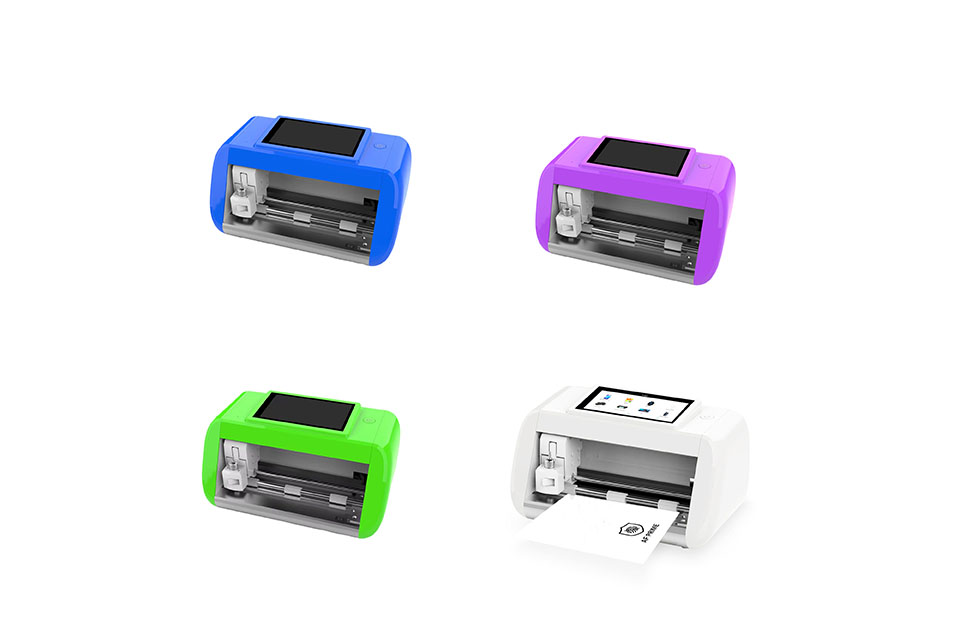
Panduan Lengkap Memilih Mesin Pemotong Film Hidrogel yang Tepat
Berinvestasi dalam mesin pemotong film hidrogel dapat merevolusi cara Anda membuat pelindung layar khusus untuk berbagai perangkat. Panduan ini akan membantu Anda memahami apakah Anda memerlukan mesin pemotong hidrogel khusus, cara menangani masalah ketersediaan model, dan apa yang diharapkan terkait pembaruan perangkat lunak dan pembatasan material. Kami juga membahas rekomendasi utama untuk memilih mesin yang tepat dan cara memastikan keuntungan jangka panjang dengan pembelian Anda.
Menyesuaikan Film Hidrogel Fleksibel untuk Bentuk Perangkat yang Unik
Menyesuaikan film hidrogel fleksibel agar sesuai dengan bentuk perangkat yang unik menawarkan tingkat perlindungan dan peningkatan estetika yang tinggi, menjawab kebutuhan akan pelindung layar yang mudah beradaptasi di pasar dengan desain perangkat yang beragam dan inovatif. Dengan memanfaatkan teknologi pemotongan yang canggih dan mempertahankan fleksibilitas serta sifat penyembuhan diri dari film hidrogel, pengguna dapat menikmati kesesuaian yang sempurna, fungsionalitas yang lebih baik, dan daya tarik visual yang lebih baik untuk perangkat mereka, sekaligus menghadapi tantangan terkait kompleksitas desain, biaya, dan ketersediaan.
Cara Memulai Bisnis Aksesoris Ponsel
Memulai bisnis aksesori ponsel melibatkan pendekatan multifaset yang menggabungkan riset pasar, perencanaan bisnis, kepatuhan hukum, pemilihan produk, sumber, branding, dan strategi pemasaran yang efektif.

Apa itu Mesin Pemotong Film dan Aplikasinya
Mesin pemotong film telah memainkan peran penting dalam evolusi pembuatan film dan berbagai proses industri dengan memungkinkan pemotongan dan penyambungan bahan film secara tepat.

Apa Itu Mesin Pemotong Pelindung Layar?
Mesin pemotong pelindung layar adalah perangkat khusus yang didesain untuk memproduksi pelindung layar yang disesuaikan untuk berbagai perangkat elektronik, termasuk smartphone, tablet, jam tangan pintar, laptop dan monitor.

Cara Kerja Mesin Pemotong Pelindung Layar Ponsel?
Mesin pemotong pelindung layar ponsel adalah perangkat canggih yang dirancang
untuk memproduksi pelindung layar yang disesuaikan untuk berbagai perangkat digital dengan kualitas tinggi
dan efisiensi.

Karakteristik Kaca Tempered Ponsel dan Pelindung Layar TPU Ponsel
Pelindung layar poliuretan termoplastik (TPU) fleksibel, tahan lama, dan
film plastik yang dapat menyembuhkan diri sendiri yang dirancang untuk melindungi layar perangkat elektronik dari
goresan, benturan, dan potensi kerusakan lainnya.

Merevolusi Perlindungan Perangkat dengan Mesin Pemotong Pelindung Layar
Apakah Anda memiliki smartphone, tablet, atau smartwatch, mesin serbaguna ini mengakomodasi beragam perangkat. Alat ini secara mulus beradaptasi dengan dimensi gadget Anda, menawarkan kesesuaian khusus yang tidak dapat ditandingi oleh pelindung umum.

Garansi Pelindung Layar Seumur Hidup
Garansi seumur hidup pelindung layar adalah jaminan yang diberikan oleh produsen bahwa
berjanji untuk memperbaiki atau mengganti pelindung layar selama masa pakai produk, dengan syarat dan ketentuan tertentu.
