
1. What Is a Zagg InvisibleShield Screen Protector?
Zagg InvisibleShield screen protectors are among the most popular options for protecting your smartphone or tablet screen. Known for their durability and clarity, these protectors are made from high-quality tempered glass or advanced polymers designed to resist scratches, cracks, and smudges. They are available for a wide range of devices, including Apple® iPhone® models like the iPhone 6 and 6s.InvisibleShield protectors are designed to be ultra-clear and virtually invisible, ensuring that your screen looks as good as it feels. However, even the best screen protectors need to be replaced eventually, whether due to wear and tear or personal preference.
2. Why Would You Need to Remove a Screen Protector?
There are several reasons why you might need to remove your Zagg InvisibleShield screen protector:- Cracks or Damage: Over time, even the toughest tempered glass protectors can crack or chip, especially if your phone has been dropped.
- Upgrading to a New Protector: You may want to replace your current protector with a newer model or a different type of screen protector.
- Improper Application: If your screen protector was applied incorrectly and has bubbles or misalignment, removing and reapplying it can fix the issue.
- Device Cleaning: Sometimes, removing the protector is necessary to thoroughly clean your screen.
3. Can You Remove a Zagg InvisibleShield Without Damaging Your Screen?
Yes, you can remove a Zagg InvisibleShield screen protector without damaging your screen, as long as you follow the correct steps. The adhesive used on these protectors is strong enough to hold the protector in place but gentle enough to allow for safe removal. The key is to work slowly and carefully, using the right tools and techniques.4. Tools You’ll Need for Safe Removal
Before you begin, gather the following tools to make the process easier:- Plastic Card (e.g., credit card): To gently lift the edges of the screen protector.
- Hairdryer (optional): To soften the adhesive for easier removal.
- Microfiber Cloth: For cleaning the screen after removal.
- Isopropyl Alcohol (optional): To remove any adhesive residue.
5. Step-by-Step Guide to Removing a Zagg InvisibleShield Screen Protector
Follow these steps to safely remove your Zagg InvisibleShield screen protector:- Start at the Corners: Use your fingernail or a plastic card to gently lift one corner of the screen protector. Be careful not to scratch the screen.
- Work Slowly: Once the corner is lifted, slowly peel the protector away from the screen. Pull it back at a low angle to reduce stress on the adhesive.
- Use Heat if Necessary: If the protector is difficult to remove, use a hairdryer on a low setting to warm the adhesive. Hold the dryer about 6 inches away from the screen and move it in a circular motion for 15–20 seconds.
- Remove Residue: After the protector is removed, check for any adhesive residue. Use a microfiber cloth and isopropyl alcohol to clean the screen.
6. How to Handle a Cracked or Damaged Screen Protector
If your screen protector is cracked or damaged, extra care is needed during removal:- Wear Gloves: To protect your hands from sharp edges.
- Use Tape: Apply a strip of tape to the cracked area to prevent shards from falling off during removal.
- Work Gently: Avoid applying too much pressure, as this could cause the cracks to spread.
7. Cleaning Your Screen After Removal
Once the screen protector is removed, it’s important to clean your screen thoroughly before applying a new one. Here’s how:- Wipe with a Microfiber Cloth: Remove dust and fingerprints.
- Use Isopropyl Alcohol: Dampen the cloth with alcohol to remove any adhesive residue.
- Dry the Screen: Ensure the screen is completely dry before applying a new protector.
8. How to Apply a New Screen Protector
Applying a new screen protector is just as important as removing the old one. Follow these steps for a flawless application:- Clean the Screen: Use a microfiber cloth and alcohol to ensure the screen is spotless.
- Align the Protector: Carefully align the new protector with your screen, making sure the cutouts match the camera and sensors.
- Apply Slowly: Press the protector onto the screen, starting from the center and working outward to remove air bubbles.
9. Common Mistakes to Avoid During Removal
Avoid these common mistakes to ensure a smooth removal process:- Using Sharp Tools: Never use metal tools or sharp objects, as they can scratch your screen.
- Rushing the Process: Take your time to avoid damaging the screen or leaving adhesive residue.
- Skipping Cleaning: Always clean your screen after removing the protector to prepare it for a new one.
10. FAQs About Zagg InvisibleShield Screen Protectors
Q: Can I reuse my Zagg InvisibleShield screen protector? A: No, Zagg InvisibleShield protectors are designed for single use and cannot be reapplied once removed.Q: What should I do if the adhesive won’t come off? A: Use isopropyl alcohol and a microfiber cloth to gently remove stubborn adhesive residue.Q: How often should I replace my screen protector? A: Replace your screen protector whenever it becomes cracked, scratched, or loses its clarity.

Er Hydrogel skærmbeskytter bedre end hærdet glas?
Valget mellem skærmbeskyttere med hydrogel og hærdet glas afhænger af dine prioriteter.
Sådan vælger du den rigtige smart screen protector cutter til enheder i forskellige størrelser
For effektivt at imødekomme den voksende efterspørgsel efter skræddersyede skærmbeskyttere til forskellige enheder skal man vælge den rigtige smarte skærmbeskyttelsesskærer og foretage en omhyggelig evaluering af maskinkompatibilitet, præcision, brugervenlighed og pris, så man sikrer både øjeblikkelig funktionalitet og fremtidig tilpasningsevne.
Ceramic vs. Hydrogel Screen Protector
Both ceramic and hydrogel screen protectors have their unique advantages.
How to Get Rid of Air Bubbles in Screen Protector?
By following these guidelines, you can ensure your screen protector is applied correctly and remains bubble-free, enhancing both the appearance and functionality of your device.
Sådan sætter du en skærmbeskyttelse på uden bobler: Den ultimative guide
Er du træt af, at de irriterende luftbobler ødelægger din perfekte skærmbeskyttelse? Så er du ikke alene! Det kan virke som en umulig opgave at sætte en skærmbeskyttelse på uden bobler, men med de rigtige teknikker er det nemmere, end du måske tror. I denne omfattende guide fører vi dig gennem processen trin for trin og deler eksperttips og -tricks, der hjælper dig med at opnå en fejlfri, boblefri påsætning. Uanset om du beskytter din smartphone, tablet eller en anden enhed, vil denne artikel give dig den viden, der skal til for at gøre det rigtigt første gang.

Hvilken filmskæremaskine og dens anvendelse
Filmskæremaskiner har spillet en afgørende rolle i udviklingen af filmproduktion og forskellige industrielle processer ved at muliggøre præcis skæring og splejsning af filmmaterialer.

Hvad er en skæremaskine til skærmbeskyttelse?
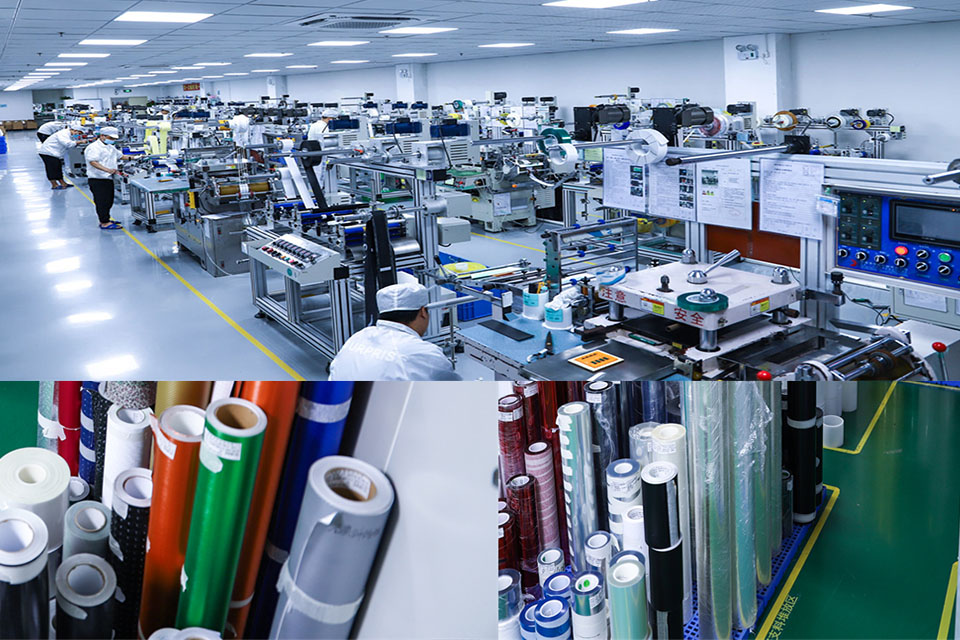
En skæremaskine til skærmbeskyttelse er en specialiseret enhed, der er designet til at producere skræddersyede skærmbeskyttere til forskellige elektroniske enheder, herunder smartphones, tablets, smartwatches, bærbare computere og skærme.

Hvordan skæremaskine til skærmbeskyttelse af mobiltelefoner fungerer?
En maskine til at skære skærmbeskyttelse til mobiltelefoner er en sofistikeret enhed designet
at producere skræddersyede skærmbeskyttere til forskellige digitale enheder med høj præci
sion og effektivitet.

Karakteristika for hærdet glas til mobiltelefoner og TPU-skærmbeskyttelse til mobiltelefoner
Skærmbeskyttere af termoplastisk polyuretan (TPU) er fleksible, holdbare og
selvhelende plastfilm designet til at beskytte elektroniske enheders skærme mod
ridser, slag og andre potentielle skader.

Revolutioner beskyttelsen af enheder med en skæremaskine
Uanset om du har en smartphone, en tablet eller et smartwatch, kan denne alsidige maskine rumme en lang række enheder. Den tilpasser sig problemfrit til dimensionerne på din gadget og giver en tilpasset pasform, som generiske beskyttere ikke kan matche.

Livstidsgaranti på skærmbeskyttelse
En livstidsgaranti på skærmbeskyttelse er en garanti fra producenterne, der
lover at reparere eller udskifte en skærmbeskytter i hele produktets levetid på særlige vilkår.
